SMS Consent
Effective November 3, 2026. Updated November 11, 2026.
Legion Fiber LLC is a door to door sales company. Our representatives sell fiber internet service to homeowners for providers such as Brightspeed, Ezee Fiber and Kinetic. This page explains exactly how a homeowner opts in to text messages from their representative, and what we record when they do.
How you opt in: Text to Join
You text us first. Nobody can sign you up for texts. You opt in by sending a text yourself, from your own phone, to your representative’s business number.
1. The representative saves your details. At your door, the representative types your name and, if you give them, your address, mobile number and the provider you asked about into the Save a lead screen of the Legion app on their phone, and taps Save and show the code.
2. The representative shows you a code. Their screen shows a QR code and the words “Have them scan this with their phone’s camera.” Directly under the code, before you scan, you read this (with your representative’s first name):
“Scan to get texts from Riley, your fiber rep, about your fiber internet options, order and install, plus occasional offers. Msg frequency varies. Msg and data rates may apply. Reply HELP for help, STOP to opt out. Consent is not a condition of purchase. Privacy: legionfiber.app/privacy Terms: legionfiber.app/terms”
3. You scan it with your own phone. Your Messages app opens a new text to your representative’s business number, with this already written (your first name at the end):
“YES, text me about fiber internet. Maria”
4. You send it yourself. Only you can send it, and nothing is texted to you until you do. If you do not want texts, do not send it: the representative saves your details with Save only, no texts.
5. We record your opt in. When your YES arrives we store your mobile number, the date and time it arrived, the representative whose number you texted, and the exact words you sent, under the version label door_v9.
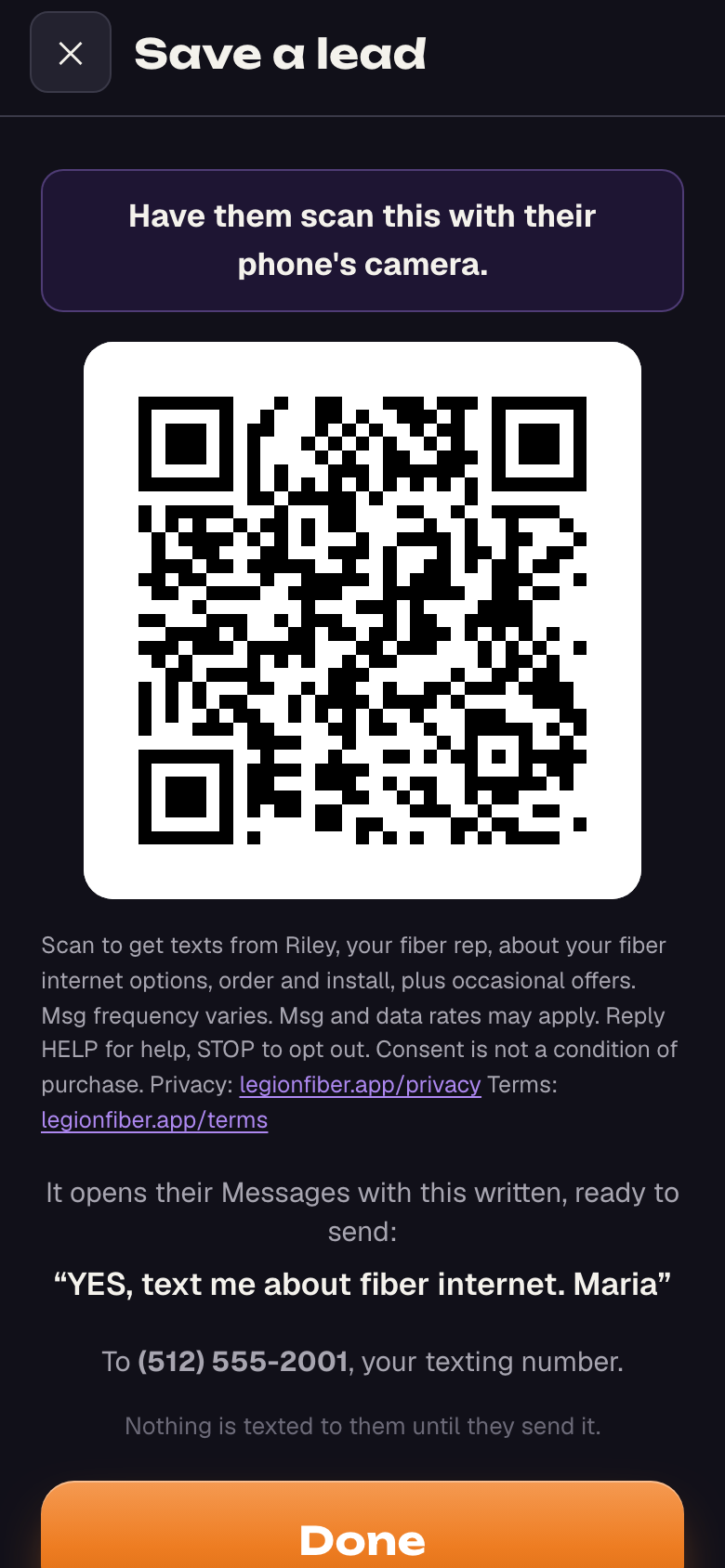
“Scan to get texts from Riley, your fiber rep, about your fiber internet options, order and install, plus occasional offers. Msg frequency varies. Msg and data rates may apply. Reply HELP for help, STOP to opt out. Consent is not a condition of purchase. Privacy: legionfiber.app/privacy Terms: legionfiber.app/terms”
6. You get one confirmation. Right after your YES, your representative’s number sends this, with their contact card (their first name and “Fiber rep”):
“Thanks Maria! It's Riley, your fiber rep. I'll text you here with updates. Msg frequency varies. Msg and data rates may apply. Reply HELP for help, STOP to opt out.”
What you will receive
Texts from your representative, signed with their first name, about your fiber options, your order and your installation, with occasional offers. Automated messages are a few follow up texts, then a check in every 15 days to day 90 and every 30 days after, until you reply, buy or text STOP. They go only between 9am and 8pm in your local time. Message frequency varies. Message and data rates may apply. Automated texts go only to a customer who texted YES this way.
How to stop, and how to get help
Stop. Reply STOP to opt out at any time. STOPALL, UNSUBSCRIBE, CANCEL, END and QUIT work too. You will receive one confirmation, “You're unsubscribed and won't get more texts. Reply START to opt back in.”, and then no further texts from any of our representatives’ business numbers.
Start again. Reply START to opt back in.
Help. Reply HELP or INFO and your representative’s number answers: “This is Riley, your fiber rep. Text me here with any question, or reply STOP to opt out. Msg and data rates may apply.” You can also email zackerys@legionfiber.com.
Your information
Opting in is not a condition of purchase. Your phone number, your name and your text opt in consent are never shared with or sold to third parties or affiliates for their marketing or promotional purposes. See our Privacy Policy and our Terms of Service.
Contact. Legion Fiber LLC, zackerys@legionfiber.com.